


Tidy: House Cleaning Schedule
4.232.00 Reviews
App Specs
- Version
- 5.0.0
- Updated On
- License
- Free
- Downloads
- 100,000+
- Developer
- Artem Chakhouski
- Categories
- House & Home
- Platform
- Android, iOS
Screenshots
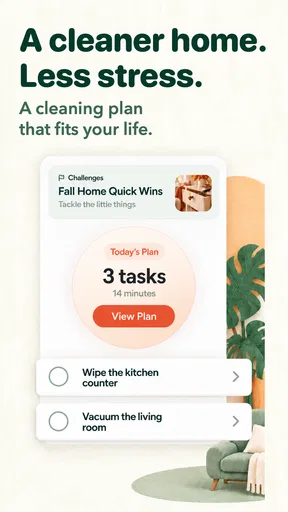
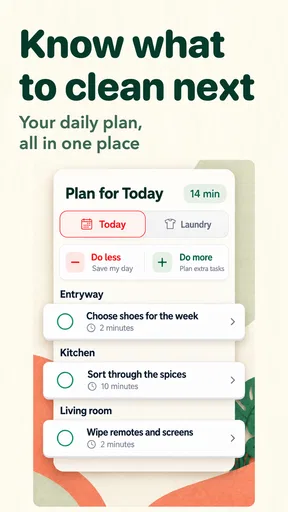
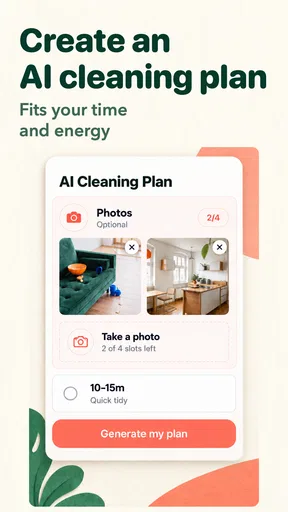
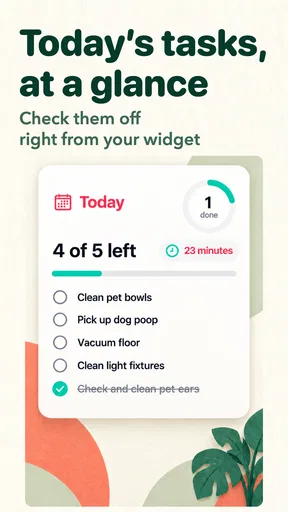

 Analysis by AppCompare
Ever found yourself drowning in chores and wishing for a magical solution to organize your home cleaning routine? Well, I’ve been there, and let me tell you, Tidy: House Cleaning Schedule might just be the app you’ve been searching for. This nifty app promises to turn your chaotic cleaning schedule into a well-oiled machine. Let’s dive into how it works and what makes it stand out.
A routine that works beyond a chore list
The useful question with a cleaning app is not simply whether it can store chores. It is whether it helps you decide what to do next without turning housework into another project to manage. Tidy is most appealing when I treat it as a guide for distributing recurring work, rather than as a strict plan that must be followed perfectly. A schedule can make neglected jobs visible, but it should still bend around busy weeks, guests, illness, or the ordinary fact that a home does not get dirty on a perfectly predictable timetable.
That distinction matters if you are choosing between a dedicated housekeeping tool and a notes app, calendar, or paper checklist. A notes list is quick and flexible, but recurring jobs can get buried or forgotten. A calendar is useful for time-specific commitments, though it can make routine cleaning feel like a meeting you have failed to attend. Tidy’s focus on household tasks makes more sense for people who want a continuing overview of chores, especially when the same work returns week after week.
Start with a small, realistic plan
I would not begin by entering every task I can imagine. A long list can look impressive on setup day and become discouraging by the end of the week. Instead, I’d start with the chores that genuinely cause friction at home: perhaps keeping the kitchen usable, dealing with bathroom upkeep, and remembering a less frequent job before it becomes urgent. Once that basic pattern feels manageable, it is easier to add tasks that suit the household rather than creating an idealized cleaning routine no one can keep.
A practical way to use the schedule is to separate “keep things functional” jobs from deeper cleaning. If a task is small and frequent, it may fit naturally into a regular rhythm; a more demanding job can be spaced farther apart. This is not about making every day equally busy. It is about avoiding the familiar cycle of ignoring everything until one exhausting cleaning session seems unavoidable. If the plan starts to feel like a source of guilt, I would reduce it and rebuild from the tasks that matter most.
Getting Started with Tidy
First things first, downloading Tidy: House Cleaning Schedule is a breeze. Available on both Android and iOS, you’re just a click away from transforming your household chores. Once installed, the app greets you with a simple and user-friendly interface. No complicated menus or overwhelming settings here—just straightforward functionality.
Tidy is a free housekeeping app from developer Artem Chakhouski. Its average rating is 4.2 from around 1.4 thousand ratings, and it has over 100 thousand installs. It is rated for everyone, so it is positioned as a household organizer rather than an app aimed at a narrow age group. The current version is 4.0.4, and it requires Android 7.0 or later. Those details make it worth checking that your device meets the minimum before building a routine around it, particularly if you use an older Android phone.
Worth Reading Before You Choose

EA SPORTS FC Mobile 26 Is a Bigger Football Game, but It Takes Time

Flipboard Shows What News Apps Must Do Beyond the Feed

Switching to Android Auto Means Rethinking Your Driving Routine

Google Calendar Makes a Crowded Week Easier to Manage

Ludo King Makes the Most of the Minutes Between Plans

Baby Panda World Brings Quick Play to Modern Phones, but Its Game Library Feels Busy
Setting Up Your Cleaning Schedule
One of the coolest aspects of Tidy is its customizable cleaning schedule. You start by listing all the rooms and areas in your home. From there, you can assign specific cleaning tasks to each room, whether it’s vacuuming the living room or scrubbing the bathroom tiles. The app lets you set the frequency for each task—daily, weekly, monthly, you name it.
What I really appreciate is the flexibility. Not all homes are created equal, and Tidy understands that. It lets you tailor everything to fit your lifestyle and cleaning preferences. Plus, if something unexpected pops up, you can easily adjust your schedule without a hitch.
Make the schedule reflect how your home is used
The room-based setup is most valuable when it reflects real traffic, not a generic idea of what a tidy home should look like. In a household where the kitchen is used constantly, that area may need more frequent attention than a spare room. If a bathroom is shared by several people, splitting its upkeep into manageable recurring jobs may be more practical than leaving everything for one large session. This makes the schedule a way to match effort to use, not just a catalogue of rooms.
There is also a useful trade-off in how much detail to enter. Naming a broad task can make it quick to manage, while breaking it into smaller steps can make it easier to act on when you have only a short window. For example, a general bathroom-cleaning reminder may feel too large after a tiring day; a smaller task can be easier to fit into the time available. I would keep the list specific enough to prompt action, but not so granular that checking off the list takes longer than the chore.
A realistic week might look less like a perfect rotation and more like a series of adjustments. You could plan a quick kitchen reset on a day when everyone is home, then move a deeper task if work runs late. If friends are visiting, an urgent tidy-up may take priority over the regular plan. The point is not to obey the schedule at all costs; it is to make the next reasonable job easy to see and to reschedule the rest without losing track of it.
Notifications and Reminders
If you’re anything like me, remembering to do chores is half the battle. Tidy’s notification system is a lifesaver. It sends gentle reminders when it’s time to tackle a task, making procrastination a thing of the past. You can customize the alert settings, choosing the time and frequency that best suits your routine. Trust me, it’s like having a personal assistant nagging you—but in a good way!
Reminders work best when they are tied to moments you can actually use. A prompt arriving while you are commuting or in the middle of work may simply be dismissed, so I would choose a time that leaves a realistic opening to act. I’d also avoid turning every small chore into a notification. Too many alerts can become background noise, which defeats the purpose of being reminded. Keeping alerts for the tasks most likely to slip your mind makes the system feel more helpful and less demanding.
Motivation Through Progress Tracking
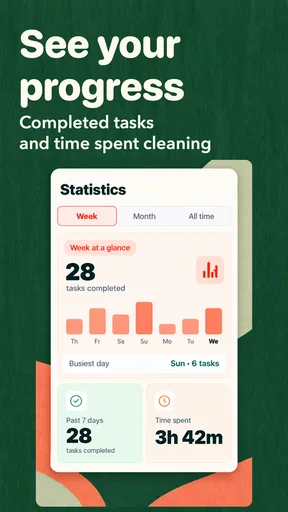
Tidy doesn’t just stop at scheduling; it also tracks your cleaning progress. The satisfaction of ticking off a completed task is surprisingly motivating. The app provides visual progress reports, so you can see how much you’ve accomplished over time. It’s a great way to stay motivated and ensure nothing slips through the cracks.
Moreover, the ability to look back at your progress can be a real eye-opener. You’ll quickly identify which tasks are being neglected and adjust your schedule accordingly. It’s all about creating a balanced and efficient cleaning routine.
Use progress as feedback, not a score
I find progress tracking most useful as a way to notice patterns. If the same job repeatedly remains unfinished, that can mean the reminder is poorly timed, the task is too large, or the frequency does not fit how the home is used. It does not automatically mean that the household is failing. Moving a chore, reducing its scope, or making it less frequent can be a better response than adding more alerts or feeling pressured to catch up all at once.
This also helps distinguish routine maintenance from an occasional reset. A run of completed small tasks may make the home easier to manage, even if a deep-cleaning job still needs attention. Conversely, a checklist can look busy without addressing the source of clutter or mess. I would use the history to decide whether the schedule is realistic and useful, rather than treating a visual report as a measure of how clean a home ought to be.
Sharing the Load
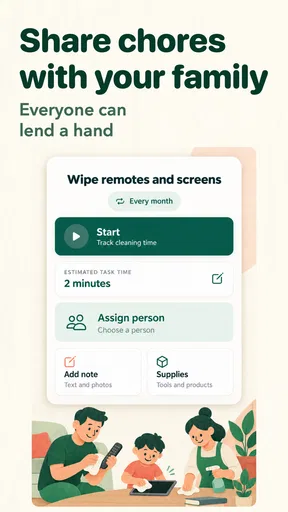
If you live with family or roommates, Tidy has a feature for sharing tasks. You can invite others to join your cleaning schedule, assign tasks, and keep everyone in the loop. This collaborative aspect is fantastic for ensuring everyone pulls their weight. No more excuses or forgotten chores!
Plus, the app offers a chat feature, allowing you to communicate directly within the app. It’s a seamless way to manage household tasks without the need for endless group texts or sticky notes on the fridge.
Agree on responsibility before inviting everyone
Sharing can help when people already want a common place to see responsibilities, but a shared checklist cannot settle disagreements about what “clean” means or how often a room needs attention. I would agree on a simple standard first: which jobs matter, who is responsible, and what counts as finished. That small conversation prevents the schedule from becoming a record of blame when one person expects a task to be done differently from another.
For a couple or a small household, assigning recurring work may cut down on repeated reminders between people. For a larger household, it can make ownership clearer, though the list still needs someone to keep it sensible as routines change. The in-app chat can keep task-related coordination near the schedule, but it is not a substitute for a conversation about workload. If household members do not want to use a shared app, a paper rota or a simple group message may be easier to maintain.
Where Tidy fits—and where it doesn’t
Tidy is a good fit if you want recurring chores organized by room, reminders to help you follow through, and a way to share household responsibilities. It is especially suited to people who feel that cleaning happens in bursts because small jobs are forgotten, or to housemates who need clearer task ownership. The app’s free starting point makes it reasonable to try as a routine organizer, while in-app purchases range from $3.99 to $14.99 per item. I would check what those purchases offer and whether I actually need them before spending; the core appeal is the structure, not buying more complexity.
It is less compelling if you already manage chores comfortably in a calendar or a shared note, or if you want a tool that automatically decides how to clean your particular home. Tidy works from the schedule you set, so useful results depend on choosing sensible tasks and keeping the plan current. It is also not the right answer for a household whose main problem is agreeing on standards or dividing labor fairly. An app can make responsibilities visible, but people still have to negotiate them.
The Final Verdict
In a nutshell, Tidy: House Cleaning Schedule is a game-changer for anyone looking to streamline their home cleaning routine. Its intuitive design, customizable features, and collaborative options make it a must-have in any household. Whether you’re a neat freak or someone who needs a little push to get started, Tidy has got your back.
So, why not give it a try? With just a few taps, you could be well on your way to a tidier, more organized home. Trust me, once you start using Tidy, you’ll wonder how you ever managed without it. Happy cleaning!
My recommendation
My honest recommendation is to try Tidy if your main challenge is remembering recurring chores or making the division of work visible. Start with a few tasks you repeatedly postpone, set reminders at times when you can act, and use the first stretch of use to see what needs adjusting. That gives you a fair sense of whether this style of housekeeping planner fits your home without turning setup into a project of its own.
I would skip it if you dislike maintaining lists, prefer a fully manual system, or expect an app to resolve household disagreements by itself. For those cases, a calendar, a shared note, or a direct conversation may be more effective. For a household that wants a flexible structure and is willing to keep it realistic, though, Tidy offers a clear, practical way to make cleaning feel less like a last-minute scramble and more like a set of manageable decisions.
Pros
- User-friendly interface for easy navigation.
- Customizable cleaning schedules.
- Reminders to keep you on track.
- Syncs with family members' devices.
- Offers tips for effective cleaning.
Cons
- Limited features in the free version.
- No offline mode available.
- Occasional sync issues reported.
- Requires frequent updates.
- Ads can be intrusive at times.
FAQs for Tidy: House Cleaning Schedule
What features does Tidy: House Cleaning Schedule offer?
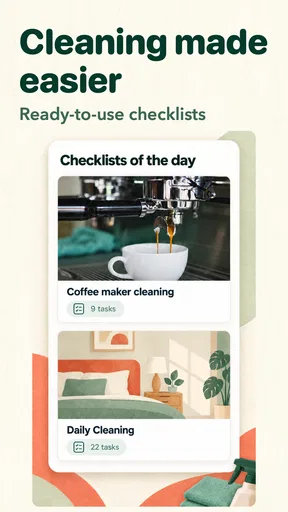
Tidy offers a comprehensive range of features to help users organize their cleaning routines efficiently. It includes customizable schedules, reminders, and checklists for different areas of the house. Users can prioritize tasks, set cleaning frequency, and even share schedules with family members. The app also provides tips for effective cleaning and maintenance.
Is Tidy suitable for both individual and family use?
Yes, Tidy is designed for both individual use and family organization. It allows multiple users to access and share the cleaning schedule, ensuring everyone in the household stays informed of their responsibilities. The app’s collaborative features make it easy to divide tasks and track progress, promoting a cleaner and more organized home environment.
Does Tidy offer reminders for cleaning tasks?
Tidy includes a robust reminder system to ensure that no cleaning task goes unnoticed. Users can set up notifications for daily, weekly, or monthly cleaning chores. These reminders can be customized according to the user's preferences, providing timely alerts that help maintain a consistent cleaning routine.
Can Tidy be customized to fit my specific cleaning needs?
Absolutely, Tidy offers extensive customization options. Users can tailor the app to fit their specific cleaning preferences and schedules. You can create personalized checklists, adjust frequency settings for different tasks, and prioritize areas of the home that need more attention. This flexibility makes it a versatile tool for maintaining a tidy living space.
Is Tidy easy to use for beginners?
Yes, Tidy is designed with user-friendliness in mind, making it accessible even for beginners. The app features an intuitive interface with easy navigation, allowing users to quickly set up and manage their cleaning schedules. Additionally, it offers tutorials and tips to help new users get started and make the most of its features.


